Hints for tool selection
Several web applications are now available to assist in the creation and ongoing development of data management plans. The two best-known examples are DMPonline, developed by the UK’s Data Curation Center (DCC), and the University of California’s DMPTool; both have well over 100,000 users. However, as not everyone is comfortable having their data management plans hosted on British or American servers, we would like to present some alternatives on this page and offer guidance on choosing the right tool.
The University of Wuppertal provides the Research Data Management Organiser (RDMO) for your use; this tool was developed as part of a DFG project of the same name and is now employed at many German universities. Since the software is operated by the ZIM, your data management plans are stored on one of our servers. One of RDMO’s key strengths is the flexibility of its question sets, which we, as administrators, can further develop. RDMO is now organized as a registered association; members are institutions. The software and associated content are continuously developed by the RDMO community and implemented by us.
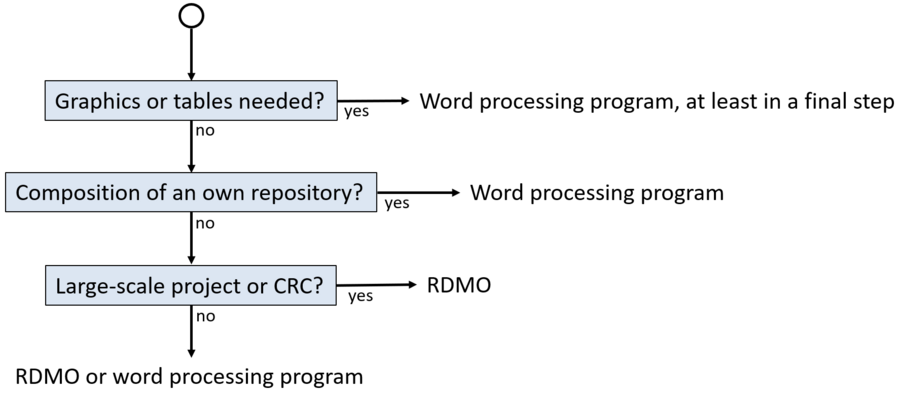
We do not claim, however, that RDMO is the best choice in every instance. The diagram below is intended to help you make your selection.
For projects in the field of psychology, we recommend DataWiz, provided by the Leibniz Institute for Psychology (ZPID).
The GFBio Data Management Plan Tool is an option for researchers in the life sciences who are already working with GFBio. This tool generates data management plans exclusively in PDF format, meaning the plans cannot be edited further in a word processor. However, registered GFBio users can contact GFBio support should the data management plan need to be modified later.
RDMO is particularly well-suited for large-scale projects comprising sub-projects that each require their own data management plan. By using a standardized set of questions, sub-plans can be more easily consolidated into a master plan at a later stage. RDMO supports versioning, making it ideal for plans intended to evolve over time — for instance, when an initial version for a funding agency is followed by subsequent versions covering ongoing work and, ultimately, long-term archiving at the project's conclusion. This feature is also highly beneficial for large-scale projects involving multiple phases.
In most cases, post-processing the plan in a word processor will be necessary — for example, to insert headings or refine the layout. None of the tools support the insertion of images or tables. Yet, such elements are often useful for providing an overview or displaying a timeline — particularly when the data management plan is developed in conjunction with a milestone plan. We recommend this approach to better account for the time required for research data management. All the tools recommended here feature an export function that allows you to convert your plan into a format compatible with standard word processing software.
There are no mandatory requirements regarding the choice of a data management plan tool; you are free to choose whichever suits you best. Naturally, a data management plan can also be drafted directly in a word processor, perhaps with the aid of a checklist.