Writing a data management plan with RDMO
RDMO Online Tool for Creating Data Management Plans
The Research Data Management Service Centre offers the online tool RDMO (Research Data Management Organiser) to staff members of the University of Wuppertal (BUW) who wish to create a data management plan. A ZIM username and password are required to log in; authentication takes place via the BUW Shibboleth Identity Provider. Access is not possible using a student account (with student ID number).
After logging in for the first time, your project list will be empty. You can create a data management plan by filling-in a web form; to do so, click Create new project. Select the "All questions" questionnaire — see the screenshot below.
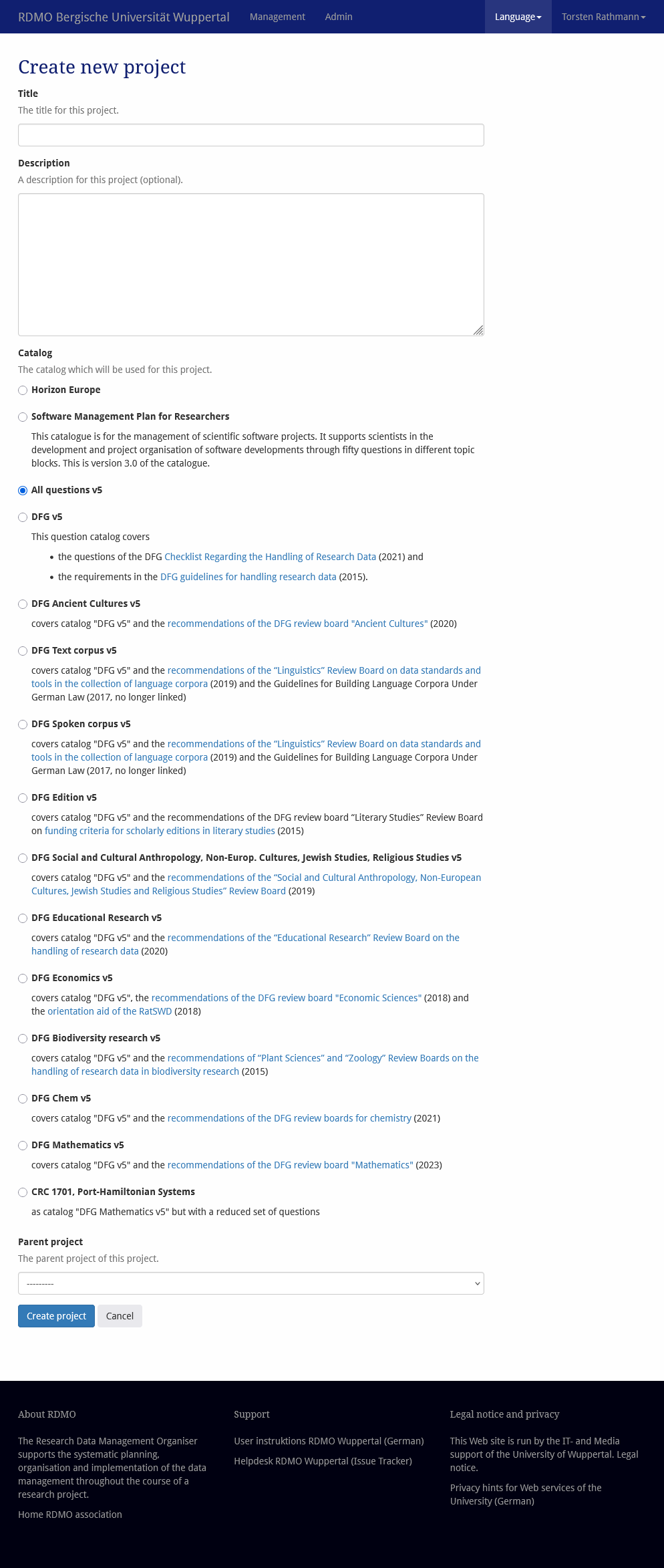
Screenshot of the DMP creation form in RDMO
After creating the data management plan, click Answer questions and fill out the plan. You can pause your work at any time and resume filling it out later. RDMO features an auto-save function. You can navigate through the plan using the "Back" and "Continue" buttons or the navigation menu in the right-hand column.
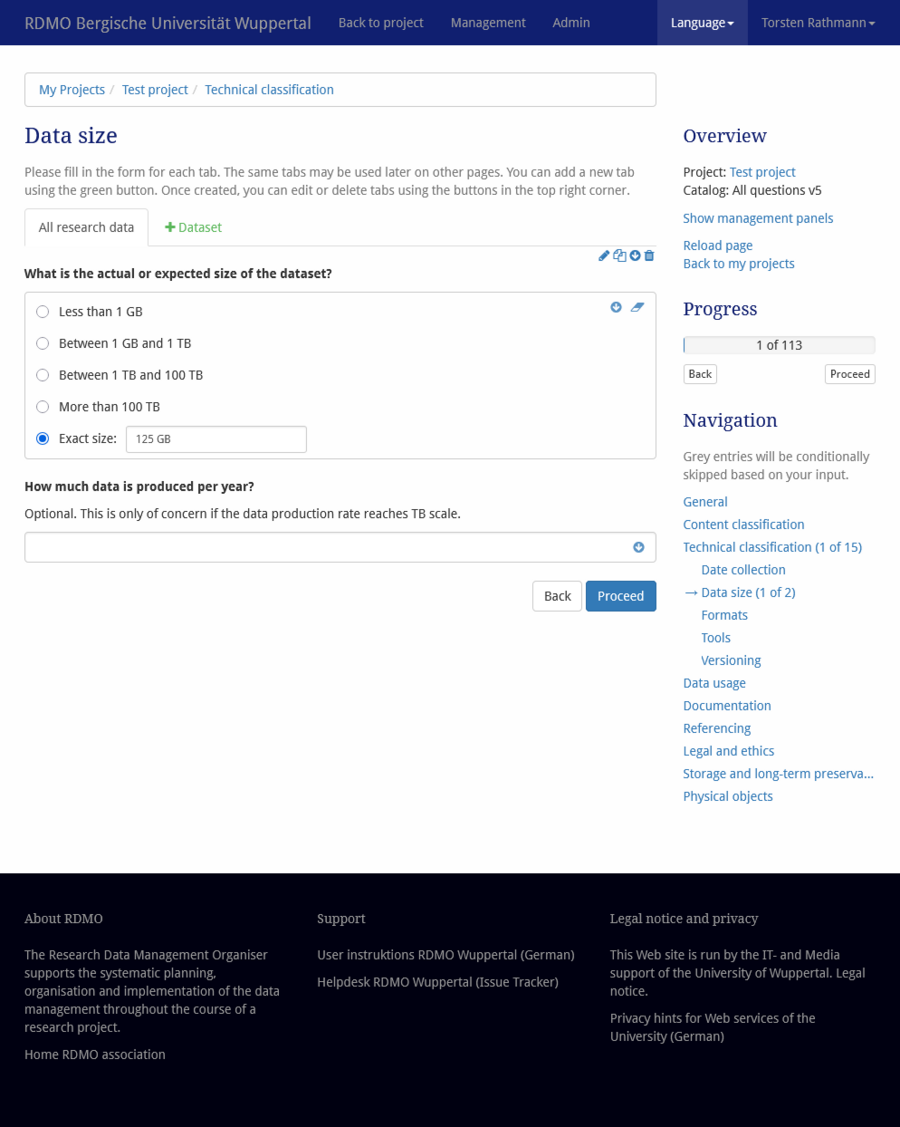
The questionnaires we offer in conjunction with RDMO all ask for datasets. You define for yourself what constitutes a dataset within your project. If it is not yet known which data will be managed later, you can simply enter a single entry for all research data to start with. Indeed, a data management plan is not considered immutable; on the contrary, it must be updated whenever plans change.
It is possible—and technically unproblematic—to skip questions, except when asked for the dataset name. You must enter a name at that point to reveal the dataset-specific questions. These dataset-specific questions make up the bulk of the questionnaire. Dataset names—like all other entries—can be changed at any time later on.
The question
Does your institution have rules or guidelines for the handling of research data?
can be answered for project partner University of Wuppertal with the following citation:
principles and recommendations on handling research data of the University of Wuppertal (in German, bscw.uni-wuppertal.de/pub/bscw.cgi/d9959781/am15093.pdf and bscw.uni-wuppertal.de/pub/bscw.cgi/d9959792/am15094.pdf)
Versions and project members
Versions of the data management plan can be saved using the snapshot function. Reverting to an earlier version is possible.
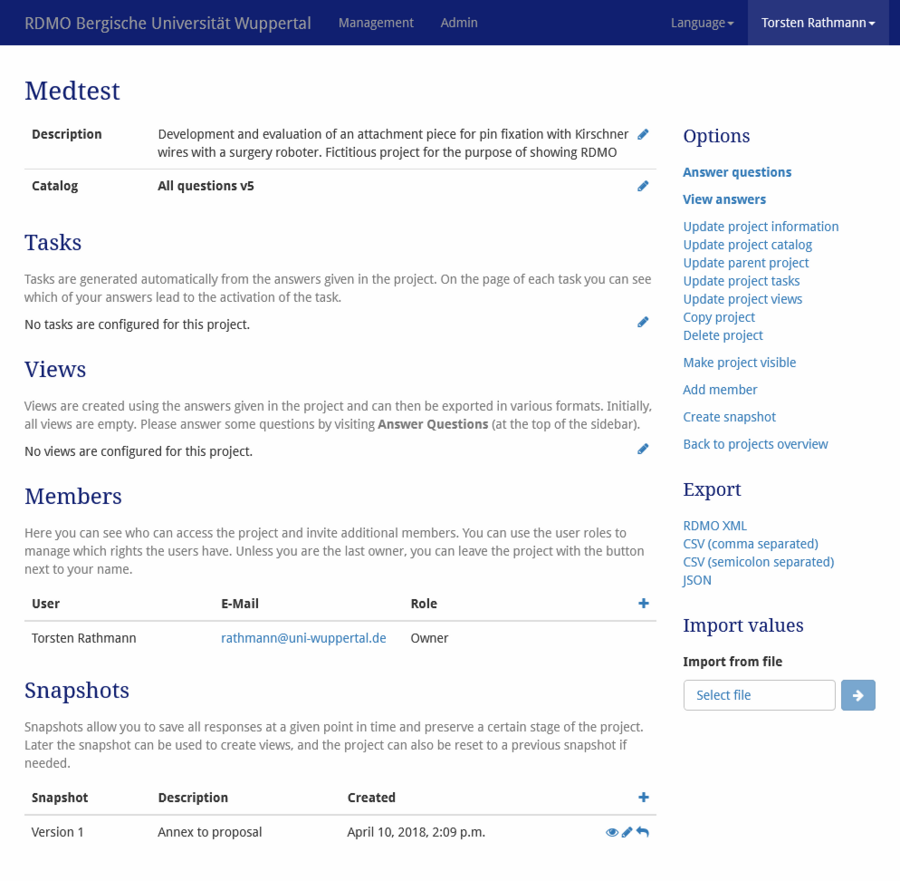
The Add member function allows a project owner to add other users to the project. In doing so, these new members are granted permissions. Four different roles are available:
| Role | Description |
|---|---|
| Guest | can only read and export (download of the data management plan) |
| Author | can also edit the data managment planern |
| Manager | as Author but with the additional right to create snapshots (versions) |
| Owner | holds all rights, including the right to delete the entire project, and can grant rights to other users |
Only users who hold a ZIM user account at the University of Wuppertal can be added. External users must first apply for a guest account. Provide the project owner with the email address you received from the University of Wuppertal's ZIM so that you can be invited to the project team.
OUTPUT
The data management plan — whether complete or not — can be displayed by clicking View answers (under "Options" on the right side of the project overview). From there, the data management plan can be exported to several common text formats and saved locally for further editing.
Views are specialized output filters. They adjust the output to meet the requirements of research funders or format the data management plan to resemble one created with other tools, such as DMPonline or DMPTool. Views are strictly output functions; they do not alter the answers stored in the RDMO database. Multiple file formats are available for exporting each view.
BACKUPS
Although ZIM backs up the server as a whole, it is not possible to restore individual data management plans—for instance, following accidental deletion. We therefore ask you to save your data management plans locally in RDMO XML format. They can be restored using RDMO’s import function. This also allows you to transfer your data management plan to another institution that offers RDMO.
Questionnaires for DFG-funded projects
For a range of disciplines — such as biodiversity research — the DFG recommends more detailed and precise data management planning as early as the proposal stage. If your field is not among these disciplines, you can use the "DFG" questionnaire. This contains only questions that align particularly well with the requirements for this stage outlined in the DFG checklist on handling research data; it is therefore shorter than the "All questions" questionnaire.
| Catalog | Recommendations |
|---|---|
| DFG Ancient Cultures | DFG Review Board "Ancient Cultures", Handreichung zum Umgang mit Forschungsdaten (2020, German) |
| DFG Spoken corpus | Recommendations of the “Linguistics” Review Board on data standards and tools in the collection of language corpora (2019) and the Guidelines for Building Language Corpora Under German Law (2017, no longer linked) |
| DFG Text corpus | Recommendations of the “Linguistics” Review Board on data standards and tools in the collection of language corpora (2019) and the Guidelines for Building Language Corpora Under German Law (2017, no longer linked) |
| DFG Edition | DFG review board “Literary Studies” on funding criteria for scholarly editions in literary studies (2015, German) |
| DFG Social and Cultural Anthropology, Non-Europ. Cultures, Jewish Studies, Religious Studies | Recommendations of the “Social and Cultural Anthropology, Non-European Cultures, Jewish Studies and Religious Studies” Review Board (2019, German) |
| DFG Educational Research | Recommendations of the “Educational Research” Review Board on the handling of research data (2020, German) |
| DFG Economics | Recommendations of the DFG review board "Economic Sciences" (2018) and the orientation aid of the RatSWD (2018) |
| DFG Biodiversity research | Recommendations of “Plant Sciences” and “Zoology” Review Boards on the handling of research data in biodiversity research (2015, German) |
| DFG Mathematik | Recommendations of the DFG review board "Mathematics" (2023, German) |
| DFG Chem | recommendations of the DFG review boards for chemistry (2021, German) |
If the data management plan is to be supplemented with additional questions later, it is possible to switch to the "All questions" question set.
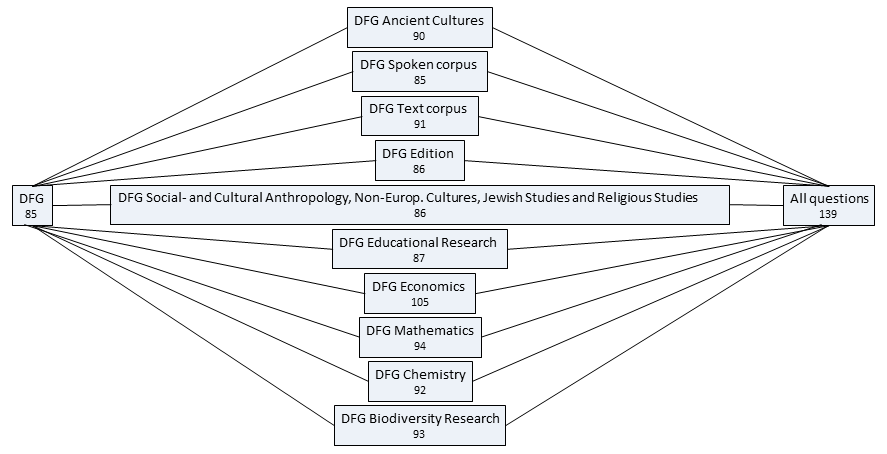
The connecting lines in the figure represent a superset-subset relationship. For example, "DFG" is a subset of "DFG Educational research," which in turn is a subset of "All questions." The number of questions in each catalog is displayed below the catalog name.